
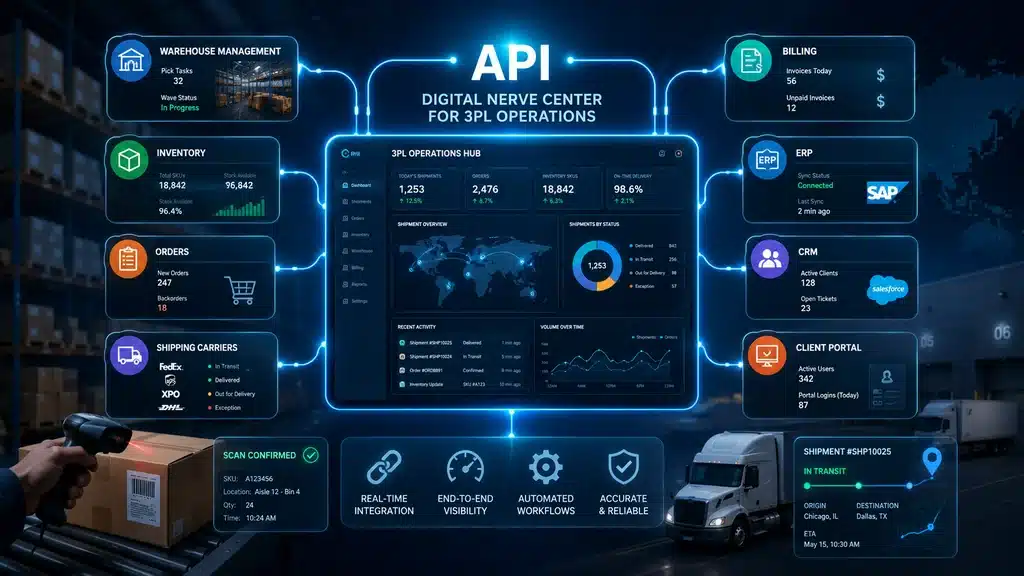
An order comes in from a client, but someone has to enter the details into another system. The dispatch team is ready to arrange a shipment, but the carrier’s confirmation is still sitting in an email. Later, the billing team discovers that an additional charge was never passed on to finance.
None of these problems is unusual in a growing 3PL business.
The difficulty begins when the same information has to move through several disconnected applications, spreadsheets, and teams.
3PL integration helps address these gaps by connecting the systems involved in daily logistics operations.
It does not necessarily require replacing every application. In many cases, the first step is making the existing systems exchange information more reliably.
What Is 3PL Integration?
3PL integration is the process of connecting a third-party logistics provider’s systems with client applications, ERP platforms, carrier systems, tracking services, billing software, and other operational tools so they can exchange relevant business information.
This exchange may use APIs, Electronic Data Interchange (EDI), managed file transfers, prebuilt connectors, or integration platforms.
For example, a client may send an order from its ERP system. The 3PL receives it, processes the shipment, records its status, and sends relevant updates back to the client.
The connection can also help pass completed operational activities to billing, provided the necessary systems and rules are configured.
The purpose is to make information available where it is needed, without repeatedly entering the same details.
Why 3PL Operations Become Difficult Without Proper Integration
Many logistics companies begin with a manageable arrangement.
Clients email orders. Employees update their internal systems. Dispatch teams coordinate with carriers through calls or portals. Finance prepares invoices from completed shipment records.
This may work with a limited number of clients and transactions.
As the business grows, however, the amount of information that needs to move between these teams increases.
Common problems include:
- Orders entered into multiple applications
- Missing or inconsistent client information
- Carrier confirmations arriving late
- Shipment tracking events not reaching customer service
- Billable activities remaining outside the billing system
- Client reports prepared from different data sources
- Returns and reconsignment requests handled through separate emails
The problem is not always that the information is wrong. Sometimes the correct information exists, but the team that needs it cannot access it in time.
Businesses facing these issues may also recognize the signs their 3PL management process has outgrown spreadsheets.
Common 3PL Integration Methods
API integration gets much of the attention, but it is not the only method used in logistics.
|
Integration method |
How it works | Common use |
Main consideration |
| API | Applications exchange information through defined interfaces | Orders, tracking, carrier communication | API availability, limits, authentication, and reliability |
| EDI | Systems exchange standardized electronic business documents | Load tenders, shipment status, invoices | Trading-partner standards and data mapping |
| SFTP / Managed File Transfer | Files are securely transferred between systems | Scheduled order files and transaction records | File formats, schedules, and failure handling |
| File-based import/export | Data is imported or exported in formats such as CSV | Legacy systems and smaller partner workflows | Validation and manual dependencies |
| Middleware / iPaaS | An integration layer connects and coordinates several applications | Multi-system and multi-partner integration | Cost, configuration, monitoring, and vendor dependency |
| Prebuilt connectors | Existing integrations connect supported products | Common ERP, ecommerce, or carrier platforms | Supported versions and available functions |
The best method depends on the systems involved, transaction volume, partner requirements, and how quickly information needs to be exchanged.
A business may use an API for shipment updates, EDI for enterprise client documents, and scheduled file transfers for another partner.
The method matters less than whether the information arrives correctly and reliably.
Integration is only one part of choosing the right logistics system. Businesses should also review the essential 3PL software features, including order management, carrier coordination, billing, reporting, and client-specific workflows, before deciding which systems need to be connected.
API vs EDI in 3PL Integration
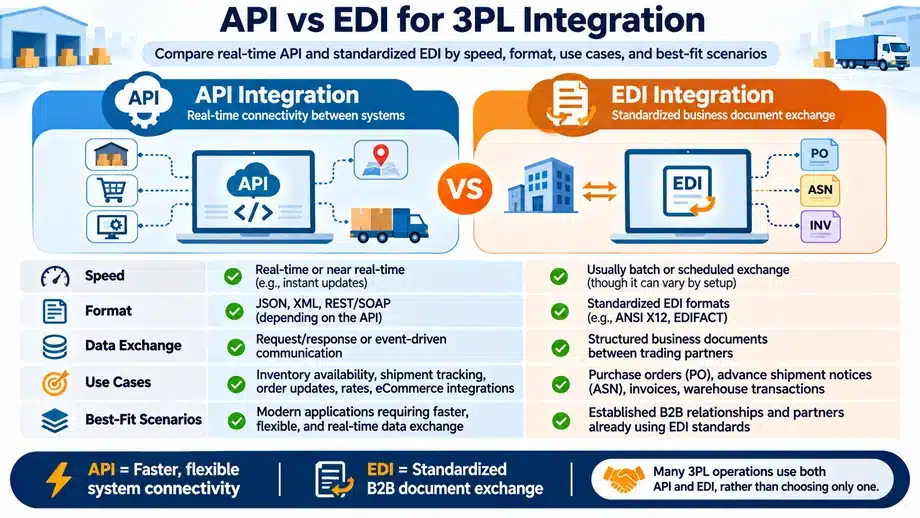
APIs and EDI are often compared as though a company must choose one or the other. In practice, many logistics businesses use both.
An API allows software applications to exchange information through a defined interface. For example, a carrier API may provide shipment events or allow an application to submit a shipment request.
EDI focuses on standardized business documents exchanged between trading partners.
Common standards include ANSI X12, widely used in North America, and UN/EDIFACT, used internationally.
EDI messages also require a method of transmission. Depending on the partner, this may involve AS2, SFTP, a value-added network, or other supported channels.
An EDI translator may convert the standardized message into a format that the receiving application understands.
|
Area |
API |
EDI |
| Main purpose | Application-to-application communication | Standardized business document exchange |
| Data structure | Defined by the API specification | Defined by the relevant EDI standard and implementation guide |
| Timing | Synchronous, asynchronous, event-driven, or scheduled | Scheduled, event-triggered, or near-real-time |
| Common use | Carrier updates, order information, application services | Load tenders, shipping notices, status messages, invoices |
| Implementation needs | API documentation, authentication, mappings, error handling | Trading-partner agreements, translation, mappings, transport configuration |
APIs are not automatically real-time, and EDI is not necessarily slow or batch-based. Timing depends on the architecture, communication method, and systems involved.
API-based EDI solutions also exist, allowing applications to submit or receive EDI-related information through APIs.
Common EDI Transactions Used in Logistics
Some common ANSI X12 transaction sets include:
|
EDI transaction |
Purpose |
| EDI 204 | Motor Carrier Load Tender |
| EDI 214 | Transportation Carrier Shipment Status Message |
| EDI 210 | Motor Carrier Freight Details and Invoice |
| EDI 940 | Warehouse Shipping Order |
| EDI 945 | Warehouse Shipping Advice |
| EDI 856 | Advance Ship Notice |
| EDI 810 | Invoice |
A transportation-focused 3PL may regularly exchange load tenders and shipment status documents. A warehouse-oriented provider may need shipping orders and shipping advice.
Not every business uses every transaction type. Requirements depend on its clients, carriers, geography, and agreed document formats.
The official X12 transaction set directory provides descriptions of the available transaction sets.
What Does a 3PL Integration Architecture Look Like?
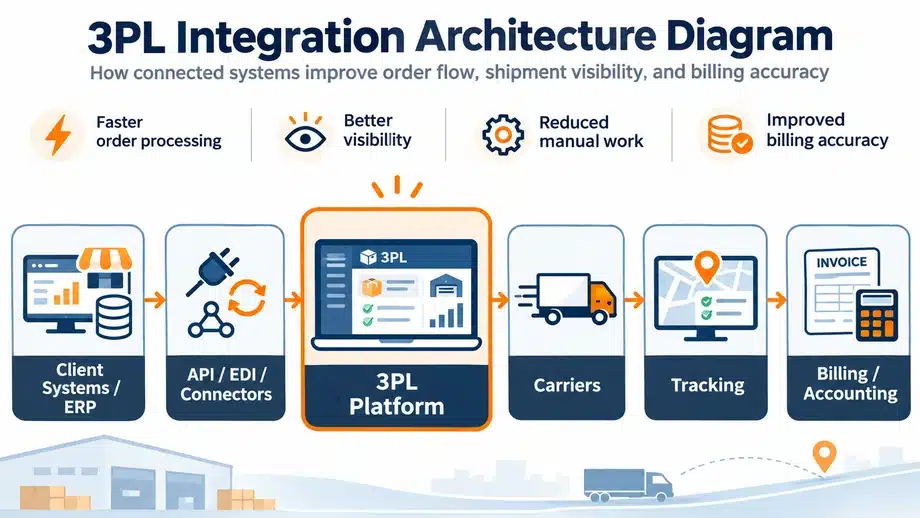
A simple example of how systems may connect is:
Client ERP / Ecommerce → API, EDI or Connectors → 3PL Platform → Carrier Systems → Shipment Tracking → Billing/Accounting
This represents a possible information flow, not a fixed architecture that every 3PL must follow.
A client order may enter the 3PL platform through an agreed integration. The operational team processes the shipment and coordinates the carrier.
Tracking information can then be received from carrier systems and shared with relevant client applications.
Completed activities and applicable charges may also flow into billing and accounting.
Some information needs to move in both directions. Order changes, acknowledgments, tracking events, invoice references, and delivery confirmations may all follow different paths.
Larger environments may use an integration platform to manage these connections and monitor transactions centrally.
How 3PL Integration Improves Logistics Operations
1. Faster Order Flow
An order may be ready in the client’s system but remain unprocessed because someone must download a file, check it, and enter the information again.
With a suitable integration, order details can move from the source system to the 3PL application through a defined process.
Validation can check required fields and identify records that need attention.
This reduces unnecessary re-entry, although employees may still need to resolve incomplete addresses, incorrect references, or special client instructions.
Connecting order sources also helps reduce order processing errors caused by repeated manual entries. However, validation is still necessary because incorrect information received from a client can move through connected systems just as easily as correct information.
For businesses handling large transaction volumes, even a small delay at order intake can affect dispatch planning later in the day.
2. Better Data Synchronization Across Systems
Different applications sometimes store the same information in different ways.
An order may have one status in the client system and another in the 3PL application. The carrier portal may show a delivery event that has not yet appeared in the reporting dashboard.
Integration helps these systems exchange relevant updates according to defined rules.
The goal is consistency across order references, client information, carrier details, shipment status, and billing records.
Inventory synchronization is another possible industry application, but it depends on the warehouse and inventory systems involved.
Integration cannot correct inaccurate source information. If the original record is wrong, connected applications may simply receive the same error.
3. Real-Time Shipment Visibility
Shipment visibility becomes difficult when employees must check multiple carrier portals and contact different teams for updates.
Depending on available carrier connections, carrier integration may support:
- Shipment requests and service details
- Tracking numbers
- Pickup and dispatch confirmations
- Shipment status events
- Delivery exceptions
- Proof of delivery (POD)
- Relevant freight charge information
Some carrier systems may also support label creation or other document services.
The available functions vary by carrier and integration.
Real-time shipment visibility depends on when the carrier records an event, when it becomes available, and how quickly the connected systems exchange it.
A shipment cannot be tracked accurately through software if the underlying carrier event has not been captured.
For a more detailed explanation, see why real-time shipment tracking is essential.
4. Cleaner Billing and Revenue Capture
Billing is one area where disconnected records can directly affect a 3PL’s revenue.
A shipment may generate a transportation charge, additional handling fee, reconsignment charge, or another billable event under the client’s agreement.
If the activity is recorded in one system but never reaches billing, the company may miss an eligible charge.
A suitable integration can pass the recorded activity to the billing application, where agreed client-specific rates can be applied.
That information can then support invoice preparation, adjustments, and reconciliation.
This does not eliminate revenue leakage. The activity must be recorded correctly, the contract rules must be accurate, and the relevant integration must work.
Our article on why 3PL companies lose revenue due to manual billing explains the financial consequences of these gaps.
5. Fewer Customer Service Escalations
When information remains in separate systems, customer service employees often have to collect it manually.
A client asks whether an order has been received. Someone contacts operations. Another employee checks the carrier portal. The response then goes back through email.
Connected systems can make relevant order and shipment information available through agreed reports, customer applications, or notifications.
This does not remove every customer query.
It does, however, make routine questions easier to answer and allows employees to spend more time resolving genuine exceptions.
6. Better Returns and Reconsignment Coordination
A failed delivery may require a return, another delivery attempt, or reconsignment to a different destination.
These activities can involve the client, carrier, operations team, and billing department.
When relevant systems exchange updated instructions and shipment records, employees can determine which action is pending and whether additional charges apply.
The exact workflow depends on the platforms involved and the available integrations.
3PL ERP, Carrier and Accounting Integration
3PL ERP Integration
A client’s ERP system may hold customer details, order information, service requirements, and relevant master data.
Depending on the design, 3PL ERP integration can transfer this information to the logistics application.
In the opposite direction, the 3PL platform may send order status, shipment updates, delivery confirmation, and applicable billing information back to the ERP.
These exchanges help reduce repeated entry between the client’s business system and the 3PL operation.
However, not every field needs to be shared. The integration should reflect the actual business requirements and data ownership rules.
Carrier Integration
Carrier connectivity can help with shipment requests, pickup information, tracking events, delivery confirmation, and freight-related records.
A 3PL using several carriers may need separate integrations because providers differ in their interfaces, status codes, and supported functions.
Even when a carrier offers an API, its available operations and data quality must be checked during implementation.
3PL Accounting Integration
3PL accounting integration connects relevant billing records with financial applications.
A typical sequence is:
Operational activity → Charge capture → Billing → Invoice → Accounting/AR → Payment and reconciliation
The integration may reduce repeated invoice entry and help maintain consistent references between billing and accounting.
Payment information and credit notes may also need to move between applications.
Businesses should verify whether the necessary accounting connection is available or requires separate development.
Why Data Mapping Matters in 3PL Integration
Two systems may refer to the same business activity using different codes or formats.
One carrier might use a particular code for “Delivered,” while the 3PL platform uses a different status value.
A client may identify an order with its own reference, while the logistics system creates another internal identifier.
Similar differences can occur in carrier codes, service types, billing codes, date formats, mandatory fields, and units of measurement.
Data mapping defines how information from one system should be interpreted and stored in another.
Poor mapping can result in rejected orders, duplicate records, incorrect shipment status, and billing discrepancies.
For example, if a transportation service code is mapped to the wrong billing category, the invoice may use an incorrect rate even though the shipment itself was processed correctly.
Mapping rules should therefore be documented, tested, and reviewed whenever a partner changes its data format.
Why Partner Onboarding Becomes an Integration Problem
Adding a new client or carrier is not always as simple as creating another account.
The partner may use a different order format, require additional fields, follow separate status definitions, or have specific security requirements.
These differences are part of the wider challenges of managing multiple 3PL clients, particularly when each customer has different order formats, billing agreements, reporting requirements, and service-level commitments.
Onboarding can involve credentials, access permissions, data mapping, validation rules, testing, documentation, monitoring, and support arrangements.
When every partner requires a completely separate custom integration, maintenance becomes difficult as the network grows.
Reusable connectors and standardized mappings may help, provided they support the partner’s actual requirements.
Point-to-Point Integration vs Integration Platform
There are two common approaches to connecting several applications.
|
Factor |
Point-to-point integration |
Integration platform |
| Structure | Direct connection between systems | Shared integration layer |
| Initial setup | May be simpler for a few connections | May require more initial planning |
| Flexibility | Suitable for specific direct workflows | Can support reusable workflows across systems |
| Maintenance | Each connection may require separate changes | Common functions may be managed centrally |
| Monitoring | Often spread across connections | May provide centralized visibility |
| Partner onboarding | Repeated configuration may be needed | Reusable patterns may simplify onboarding |
| Cost | Depends on development and maintenance | May include platform licensing and operating costs |
Neither approach is universally better.
A business connecting two compatible applications may not need a large integration platform.
A 3PL managing many clients, carriers, and connected systems may benefit from centralized monitoring and reusable integration logic.
The choice should consider the number of partners, existing applications, internal technical capacity, and long-term cost.
Risks and Limitations of 3PL Integration
Integration can reduce manual work, but it also introduces dependencies between systems.
Poor Data Quality
Incorrect client information, missing order references, or inconsistent billing codes can create problems across connected applications.
The original data needs to be checked before it is exchanged.
Integration Failures and Exception Handling
Possible failures include rejected EDI messages, API timeouts, carrier outages, missing mandatory fields, invalid codes, duplicate submissions, and partial synchronization.
A reliable design should include validation, error logging, appropriate retry logic, alerts, duplicate prevention, and reconciliation.
Automated retries need particular care. Resending a transaction without duplicate controls may create another order or charge.
Some exceptions will still require manual investigation.
Integration Security and Governance
Logistics integrations may exchange client information, shipment records, contractual details, and financial data.
Relevant safeguards can include API keys or OAuth where appropriate, encryption in transit, secure file transfer, restricted permissions, credential rotation, and audit logging.
Organizations should also define access ownership, partner permissions, data-retention requirements, and procedures for revoking credentials.
No single control guarantees complete security.
Over-Customization and Integration Sprawl
A separate integration for every partner may seem manageable initially.
Over time, however, businesses can end up maintaining many connections with different mappings, monitoring procedures, and dependencies on individual developers.
This increases the effort required for upgrades, troubleshooting, and security reviews.
Where appropriate, standard interfaces, reusable connectors, and centralized monitoring can reduce this complexity.
How Should 3PL Integrations Handle Failures?
A failed transaction should not disappear without anyone noticing.
Consider an order that is sent from a client’s ERP but rejected because the delivery address is incomplete.
The integration should identify the issue and provide enough information for the responsible team to correct it.
Where supported, the system may retry temporary failures such as timeouts.
Permanent validation problems generally require correcting the underlying data rather than repeatedly sending the same incorrect message.
The organization should also be able to reconcile source and destination records to identify missing, duplicated, or partially processed transactions.
The important requirement is clear ownership: someone must know which failures need attention and how they will be resolved.
How Do You Monitor 3PL Integrations?
Monitoring is necessary even after an integration has been tested and launched.
Operations and IT teams should be able to review information such as:
- Successful and failed transactions
- Rejected EDI documents
- API errors and timeouts
- Orders waiting for processing
- Missing tracking events
- Synchronization delays
- Unresolved exceptions
- Reconciliation results
For example, an integration may technically be running while shipment events are arriving several hours late.
That is an operational issue even if no system has completely failed.
Monitoring should therefore consider transaction success, data completeness, and timeliness.
3PL Integration Readiness Checklist
Before implementation, review the following:
- What business problem should the integration solve?
- Which systems need to exchange information?
- Who owns each important data field?
- Which integration methods are supported?
- Are required formats, codes, and mappings documented?
- What transaction volumes and update frequencies are expected?
- How will missing, rejected, or duplicate records be handled?
- What security and partner access requirements apply?
- Who will test, monitor, and maintain the connections?
- How will the business measure the results?
This assessment should involve both operations and IT.
A technically successful connection is not particularly useful if it does not support the way the business actually works.
How to Implement 3PL Integration Step by Step
Step 1: Identify the problem. Start with a recurring issue such as duplicate order entry, missing tracking events, or delayed billing records.
Step 2: Map the existing workflow. Identify where information is created, who uses it, and where it is manually transferred.
Step 3: Identify the systems involved. Confirm the client’s application, 3PL software, carrier system, accounting platform, and any other relevant tools.
Step 4: Select a suitable method. Decide whether APIs, EDI, file transfers, prebuilt connectors, or middleware fit the requirements.
Step 5: Define mapping and validation rules. Agree on references, codes, mandatory fields, status definitions, and error handling.
Step 6: Build or configure the connection. Document the integration, security arrangements, and operational ownership.
Step 7: Test normal and unusual transactions. Check successful data exchanges as well as failures and exceptions.
Step 8: Run a limited pilot. Begin with a selected client, carrier, or workflow where possible.
Step 9: Monitor after launch. Review failed messages, processing delays, data discrepancies, and operational issues.
Step 10: Expand based on results. Apply the lessons to other partners and workflows.
The sequence is deliberately gradual. Connecting every system at once can make it difficult to identify where problems originate.
What Should You Test Before Go-Live?
Successful transactions are only part of the testing process.
The team should also test incomplete orders, duplicate submissions, invalid carrier codes, rejected EDI messages, API timeouts, failed synchronization, delayed tracking events, incorrect billing values, and partial transaction processing.
Retry behaviour and reconciliation deserve special attention.
An order should not be created twice because the sending system did not receive an acknowledgment.
Similarly, a failed billing update should be visible before the invoice is finalized.
A production-like pilot helps reveal these problems while the scope is still manageable.
What Business Results Can 3PLs Expect?
The value of integration depends on the existing process, implementation quality, and actual operating requirements.
The 2025 Third-Party Logistics Study reported that 87% of surveyed shippers increased their use of outsourced logistics services, while 82% agreed that 3PLs contributed to improved customer service.
These are findings about shipper relationships and outsourcing, not measured results of implementing system integrations.
The 2025 State of the API Report from Postman found that 82% of surveyed organizations had adopted some level of an API-first approach.
This provides broader context on connected software development, but it should not be interpreted as a 3PL-specific adoption figure.
For an individual logistics business, useful integration results may include reduced manual entries, faster processing, fewer missing shipment updates, better billing record completeness, and less time spent correcting transactions.
How to Measure 3PL Integration Success
Before introducing an integration, record how the existing workflow performs.
|
Metric |
What it helps measure |
| Manual entries per transaction | Repeated data-entry effort |
| Order processing time | Delay between order receipt and processing |
| Integration success rate | Proportion of transactions processed successfully |
| Failed transaction count | Frequency of rejected or unsuccessful exchanges |
| Data synchronization latency | Time required for information to reach the destination |
| Partner onboarding time | Effort to connect a new client or carrier |
| Missing shipment update rate | Gaps in tracking information |
| Billing discrepancy rate | Incorrect or unmatched billing records |
| Exception resolution time | Time spent investigating integration problems |
| Maintenance effort | Ongoing support required for connected systems |
Compare results over a consistent period before and after implementation.
Do not assume that a faster data exchange automatically produces the same improvement in delivery performance or profitability. Those outcomes also depend on operational decisions, carrier performance, and the business’s processes.
Where Mechsoft and iLogistech Fit Into 3PL Integration
Mechsoft Digital Technologies offers iLogistech, a software platform for 3PL logistics operations.
Its published product information describes order processing, shipment tracking, document management, customer billing, accounts management, and returns or reconsignment workflows.
The product page also describes API integration with carrier systems and other internal or external business applications.
Businesses evaluating the platform should confirm which integrations are available for their own clients, carriers, ERP applications, and accounting systems.
The different API, EDI, middleware, WMS, TMS, and security capabilities explained in this article are general integration concepts. They should not all be assumed to be standard iLogistech features.
Conclusion
A logistics business cannot improve information flow simply by adding another application.
If orders, carrier updates, billing records, and client reports remain disconnected, employees will continue transferring information between systems themselves.
3PL integration helps address that problem by establishing more reliable connections between the applications involved in daily operations.
But choosing an API, EDI, or integration platform is only one part of the decision.
Businesses must also define the information being exchanged, the rules applied to it, who is responsible for errors, and how results will be measured.
The most useful starting point is the workflow that causes repeated delays, corrections, or billing problems.
Fix that connection properly before expanding to the next one.
FAQ (Frequently Asked Questions)
Q.1. What is 3PL integration?
A. 3PL integration connects logistics providers with client systems, carriers, ERP platforms, billing applications, and other tools to exchange operational information through suitable electronic methods.
Q.2. What are the common methods of 3PL integration?
A. Common methods include APIs, EDI, SFTP and managed file transfers, file-based imports, middleware, iPaaS, and prebuilt connectors.
Q.3. Is API integration better than EDI for logistics?
A. Not necessarily. APIs and EDI support different communication requirements, and many logistics businesses use both. The right approach depends on the partner, data format, supported systems, and timing requirements.
Q.4. What is 3PL ERP integration?
A. It connects an ERP application with a logistics platform so information such as orders, shipment status, delivery confirmation, and relevant financial records can be exchanged.
Q.5. How does carrier integration help 3PL companies?
A. Where supported, it can exchange shipment requests, tracking details, delivery events, POD information, and other relevant carrier records.
Q.6. Can 3PL integration improve billing accuracy?
A. It can help by transferring recorded operational activities and relevant charge information to billing systems. Accuracy still depends on correct source data, contracts, rate rules, and reconciliation.
Q.7. Does 3PL integration provide real-time tracking?
A. Not automatically. Tracking timeliness depends on carrier event capture, the available interfaces, synchronization frequency, and processing delays.
Q.8. What should be integrated first in a growing 3PL business?
A. Start with the connection causing the greatest measurable operational problem, such as repeated order entry, missing shipment updates, or delayed billing information.


