

Many logistics companies begin their 3PL management operations with Excel sheets. Spreadsheets are familiar, inexpensive, and easy to use. For a small 3PL business handling a few clients and limited daily orders, Excel can work reasonably well.
But things start getting difficult as the business grows.
More clients mean more orders, different billing agreements, additional shipment updates, and more information to manage. What once worked in a few spreadsheets may now require employees to check multiple files, correct entries, and prepare the same reports again and again.
This is usually when businesses start considering 3PL management software.
Industry trends also show growing interest in logistics technology. Extensiv’s 2025 Third-Party Logistics Warehouse Benchmark Report, based on a survey of over 200 third-party logistics warehouses, found that AI functionality was the biggest mover in planned implementations. It was cited by 33.7% of respondents for the coming year, compared with 25% in 2024 and 16% in 2023.
However, not every growing 3PL company needs advanced automation or AI. Sometimes the immediate requirement is much simpler: keeping order information accurate, tracking shipments, managing client billing, and preparing reports without spending hours on manual work.
What Is 3PL Management Software?
3PL management software is a system that helps third-party logistics providers manage orders, shipments, client-specific billing, reporting, and information exchange between connected systems.
Instead of maintaining separate spreadsheets for different activities, businesses can manage supported operations through one software platform.
The features vary from one provider to another. Some platforms focus on transportation and order processing, while others include warehouse management or integrate with separate warehouse and inventory systems.
The main purpose is to make logistics operations easier to manage as order volumes and client requirements increase.
Why Excel Works in the Early Stage of 3PL Management
Most 3PL businesses don’t start with advanced logistics software.
In the beginning, Excel is often enough for:
- Basic order records
- Small client databases
- Manual invoicing
- Shipment tracking
- Billing calculations
- Simple reporting
A logistics manager can quickly prepare a logistics spreadsheet to maintain orders, update dispatch information, or calculate client charges. There is no need to invest in additional software when the work is still manageable.
The difficulty begins when different employees need to access the same information or when one client’s process differs from another’s.
An order may be updated in one file, but the same change may not reach the billing or shipment records. Someone then has to check what happened and correct the information manually.
These small activities may not seem like a major issue individually. But when they happen across hundreds of orders, they start taking up a considerable amount of time.
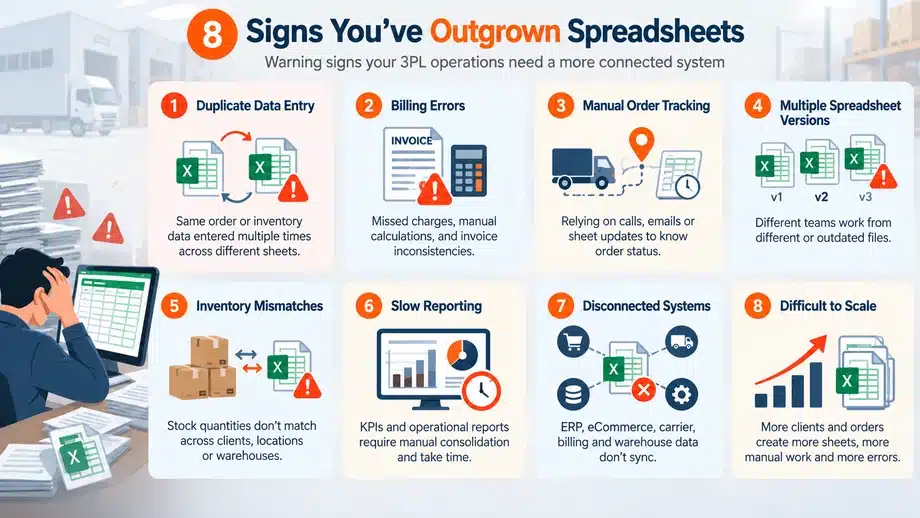
8 Signs You Need 3PL Management Software
There is no fixed number of orders or clients after which Excel becomes unsuitable.
Some companies manage their operations through spreadsheets for years. Others face problems much earlier because their billing, reporting, or integration requirements are more complicated.
The following signs can help you understand when your current process may need a more structured system.
1. Orders Are Entered Into Multiple Files or Systems
Order and Operational Data Are No Longer Reliable Across Spreadsheets
Order records are often among the first things that become difficult to manage as daily transactions increase.
An employee receives an order and enters it into Excel. The same information may then be copied into another file for shipment planning or entered again into a different application.
If the customer changes the order, employees must remember to update every relevant record.
Over time, this can lead to:
- Duplicate order entries
- Missing or incorrect order details
- Inconsistent shipment information
- Delayed operational updates
- More time spent checking records
The situation becomes harder when different employees manage different stages of order processing.
If your team frequently compares files to find the correct information, that’s a warning sign.
Suitable 3PL management software can maintain order information in a shared system, making supported updates available to employees handling the next stage of the process.
It doesn’t remove the need for accurate data entry, but it can reduce the work involved in maintaining multiple independent records.
2. Your Billing Spreadsheet Requires Regular Manual Reconciliation
Billing becomes more complicated as a 3PL company starts handling different clients.
Each client may have different:
- Storage charges
- Handling fees
- Service-level agreements (SLAs)
- Packaging rules
- Transportation charges
- Return processing fees
Managing these requirements in a billing spreadsheet is possible when transactions are limited. But as order volumes increase, the billing team may need to compare several records before preparing invoices.
They may have to check the client’s agreement, verify completed activities, calculate charges, and reconcile everything with the available operational information.
Even small billing mistakes can result in:
- Revenue leakage
- Client disputes
- Delayed invoices
- Missed billable activities
If this reconciliation has become a regular part of the billing process, the company should examine whether its current method is still practical.
3PL management software with client-specific billing functionality can apply configured billing rules and bring relevant charge information together for review.
Of course, the system still needs correct billing rules and complete operational records. Software cannot correct a poorly defined client agreement on its own.
You can also read more about why 3PL companies lose revenue due to manual billing.
3. Shipment Status Depends on Phone Calls, Emails, or Manual Follow-Ups
In many spreadsheet-driven logistics operations, employees still depend on phone calls, WhatsApp messages, emails, or verbal confirmations to know what is happening with a shipment.
A client asks for an update. Someone contacts the transport team, checks the available information, and then updates the spreadsheet or sends a reply.
The next time someone asks about the same shipment, the process may have to be repeated.
This often leads to:
- Delayed shipment updates
- Missed priority shipments
- Slower dispatch coordination
- Repeated follow-ups
- Inconsistent information shared with clients
During busy dispatch periods or seasonal demand, these delays can become more noticeable.
Software with shipment management and carrier connectivity can make available shipment information easier to access.
Depending on the integrations, some updates may come directly from connected systems instead of employees having to collect them manually.
However, the level of visibility depends on what information the carrier provides and what the software supports.
You can see similar operational issues discussed in order management challenges in high-volume 3PL operations.
4. Different Spreadsheet Versions Create Conflicting Information
This is a familiar problem in growing 3PL operations.
One employee updates a local file. Another continues working on an older version. Someone changes a formula accidentally. Another person creates a separate copy for reference.
After some time, nobody is completely sure which file has the latest information.
The confusion can affect:
- Order processing
- Billing
- Shipment updates
- Client reporting
- Operational coordination
It becomes more difficult when employees work from different locations or across multiple shifts.
Shared spreadsheets and version history can help control some of these problems. But when information is also maintained in separate applications, employees may still need to check and reconcile records manually.
A properly implemented 3PL management system can provide common operational records, access permissions, and update controls.
This can reduce confusion caused by different file versions, provided employees follow the correct processes.
5. Client-Wise Reports Take Too Much Time
As the number of 3PL clients increases, reporting usually becomes more demanding.
Clients may ask for regular updates on:
- Order processing
- Dispatch status
- Shipment delays
- Returns
- Billing records
- Service performance
The problem is that not every client wants the same report.
One may need daily shipment updates. Another may ask for a weekly order summary. A third may require billing details in a specific format.
When information is spread across different spreadsheets, employees have to collect it, check the figures, and prepare reports manually.
This creates two problems.
First, reporting takes time away from other operational activities.
Second, reports may be delayed or inconsistent because the underlying information comes from different files.
3PL management software with client-specific reporting functionality can help generate reports using information already maintained in the system.
The benefit depends on whether the software captures the required information and supports the reporting formats clients need.
6. Integrations Are Replaced by Copying and Pasting Data
A growing 3PL company may use several applications to manage its business.
Orders may come from a client’s system. Shipment information may be maintained on a carrier platform. Billing details may need to be transferred to accounting software.
When these systems are not connected, employees end up moving data between them.
For example, an order arrives in a client system. Someone exports the details, copies them into a logistics spreadsheet, and enters the required information into another application.
When the shipment status changes, that information may need to be updated again.
Apart from taking time, this creates more chances for incorrect entries or missed updates.
Suitable 3PL management software can exchange information with external applications through supported APIs, standard connectors, file exchanges, or custom integrations.
Not every software product supports every integration, though. Companies should check compatibility, field mapping, data exchange requirements, and implementation costs before selecting a system.
7. Returns and Reconsignments Are Managed Through Emails or Spreadsheets
Returns and reconsignments are another area where manual processes can become difficult to follow.
A return may involve checking the original order, updating its status, coordinating the next action, and recording any applicable charges.
A reconsignment may require a change in delivery location or instructions, which then needs to be communicated to the carrier or operational team.
If these details are managed through separate emails and spreadsheets, important information may remain with the employee handling the request.
Others may not know whether the change has been communicated or what action is still pending.
This can lead to:
- Delayed processing
- Missing instructions
- Inconsistent order records
- Billing discrepancies
- Repeated follow-ups
Software that supports returns and reconsignment workflows can help maintain the relevant records, instructions, and statuses in a structured process.
Companies should confirm that the software covers the specific return and reconsignment activities they handle.
8. Administrative Workload Grows Almost as Quickly as Order Volume
Growth is good. The difficulty begins when daily processes cannot keep up with it.
As more orders come in, employees may spend increasing amounts of time updating spreadsheets, checking records, preparing invoices, and coordinating between teams.
A file that once handled a few clients may now contain numerous tabs, billing formulas, pivot reports, client-specific sheets, and manual macros.
Eventually, it can become difficult to maintain. Sometimes only one employee knows how the formulas or macros work.
That creates another risk because too much operational knowledge remains with one person.
When every increase in order volume also creates a significant increase in administrative work, the existing process may no longer be efficient.
3PL management software can reduce certain repetitive activities through shared records, configurable workflows, and supported integrations.
It won’t eliminate every manual task. But a suitable system may allow the team to handle more transactions without administrative work increasing at the same rate.
Why Multi-Client Operations Outgrow Spreadsheets Faster
Managing operations for one client through Excel may be relatively straightforward.
The difficulty increases when a logistics company begins handling several clients, each with different requirements.
One client may require daily shipment reports. Another may follow a weekly billing cycle. A third may use different transportation charges or want order information in a particular format.
The differences may involve:
- Billing rules and service agreements
- Shipping preferences and carrier requirements
- Order processing instructions
- Reporting formats and schedules
- Return handling procedures
- Client-specific workflows
Now imagine maintaining separate spreadsheets and formulas for each of these requirements.
A billing calculation that works for one client may not apply to another. Reports may need to be prepared differently, and employees must remember which instructions belong to which client.
As the number of clients increases, keeping track of these differences takes more effort.
Software with client-specific configuration options can help businesses manage these requirements without creating a separate manual process for every client.
The number of clients alone is not the deciding factor. What matters is how different their requirements are and whether the current system can handle them reliably.
Disconnected Systems Are a Sign You Need 3PL Management Software
Sometimes the problem isn’t Excel itself. It’s that the company’s systems don’t communicate with each other.
A logistics provider may already use software for orders, transportation, accounting, and client communication.
But if each application works independently, employees still need to transfer information manually.
A typical process may look like this:
Client order system → Excel order sheet → Carrier platform → Shipment status sheet → Billing spreadsheet → Accounting software
Every time information moves from one system to another, someone may need to copy, verify, or update it.
If an order reference or shipment detail changes, that correction may have to be repeated across several records.
With suitable integrations, the process may become more connected:
Client order system → 3PL management platform ↔ Carrier and accounting systems
This is an example of how information could move between connected systems, not a standard capability of every 3PL platform.
The actual setup depends on the applications involved, available APIs, and supported data formats.
Before selecting software, businesses should identify which information needs to move between systems, how often updates are required, and how failed data exchanges will be handled.
What Can 3PL Management Software Handle?
A useful Excel alternative should address the activities that are currently consuming too much time or causing repeated mistakes.
Depending on the provider, 3PL management software may support the following functions.
Order Management
Maintaining order records, processing details, and related operational statuses without relying on separate files for each activity.
Carrier and Shipment Management
Managing shipment records, carrier information, and available status updates. Tracking capabilities depend on the supported carrier connections and information provided.
Client-Specific Billing
Handling different billing rules, service charges, and invoice-related processes based on client agreements.
Integrations
Exchanging information with client systems, carrier platforms, accounting applications, and other business tools through supported interfaces.
Returns and Reconsignment
Recording and managing return or reconsignment activities where the platform provides these functions.
Reporting and Client Visibility
Preparing operational and client-wise reports using information maintained in the system. Some products may also provide clients with access to selected information.
These are capabilities businesses should evaluate, not features automatically included in every 3PL software product.
Before making a purchase, ask the vendor to demonstrate the functions your operations actually require.
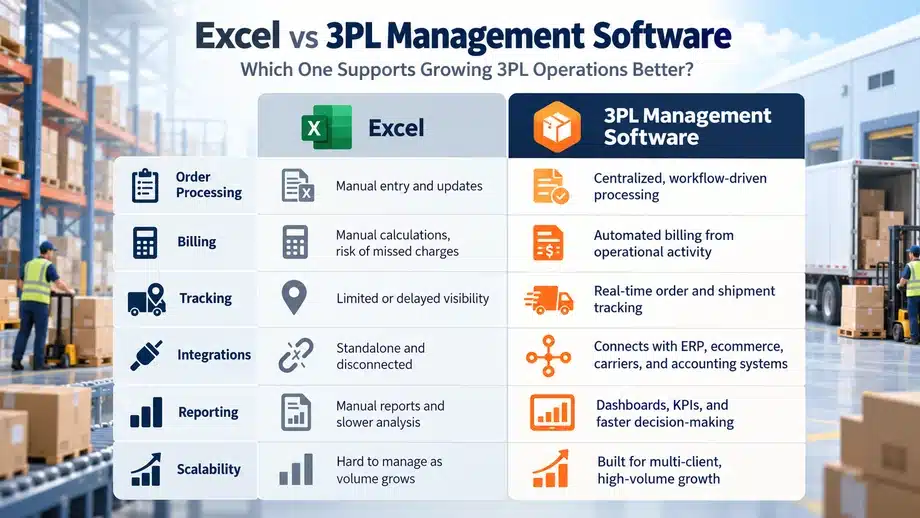
Excel vs 3PL Management Software
Excel can manage basic logistics records effectively when the workload is limited. The difference becomes more noticeable when several employees and systems need access to the same information.
|
Operational area |
Excel spreadsheets |
Suitable 3PL management software |
| Order management | Records entered and updated manually | Shared order records and supported workflows |
| Shipment tracking | Employees collect and update shipment information | Status information from supported workflows and integrations |
| Client-specific billing | Formulas and manual reconciliation | Configurable billing rules and structured charge records |
| Client reporting | Reports prepared by combining spreadsheets | Reports generated from maintained operational data |
| Integrations | Imports, exports, copying, and pasting | Supported APIs, connectors, or data exchanges |
| Returns and reconsignment | Emails and separate tracking sheets | Structured workflows where supported |
| Data consistency | Depends on file controls and manual updates | Common records, access controls, and validation where available |
| Scalability | More manual effort as complexity increases | Depends on architecture, capacity, and configuration |
Software doesn’t automatically eliminate mistakes.
Incorrect configurations, incomplete data, or poorly designed workflows can cause problems in any system.
The advantage of a suitable platform is that it gives the business a more structured way to manage activities that have become difficult to coordinate through spreadsheets.
3PL Management Software vs WMS: What’s the Difference?
3PL management software supports the broader operational and administrative requirements of third-party logistics providers, while a Warehouse Management System (WMS) focuses on activities inside the warehouse.
A WMS may include:
- Inventory and location tracking
- Receiving and putaway
- Picking and packing
- Barcode scanning
- Stock movement and adjustments
- Warehouse dispatch processes
3PL management software may focus on:
- Order processing
- Shipment and carrier management
- Client-specific billing
- Operational coordination
- Client reporting
- Integrations with other business systems
Some platforms combine these capabilities, while others focus on one area or integrate with separate systems.
For example, inventory tracking in Excel can become difficult when warehouse stock movements increase. That problem may require a suitable WMS or inventory management system.
But if the main difficulties involve order records, shipment updates, billing, and disconnected applications, the business may need broader 3PL management functionality.
The two systems can also work together.
Businesses should check what the selected product actually supports rather than assuming every 3PL platform includes complete warehouse or inventory management.
When Spreadsheets Are Still Enough for 3PL Management
Not every logistics company needs to replace Excel.
Spreadsheets can remain practical when:
- The company manages a limited number of clients.
- Order volumes are low and predictable.
- Billing rules are straightforward.
- Only a few employees update operational records.
- Reporting requirements are simple.
- Existing systems don’t require complicated integrations.
- Manual work is manageable without regular mistakes or delays.
Shared spreadsheets, data validation, controlled access, and consistent file management can also improve the reliability of existing processes.
Moving to software too early can create unnecessary cost and implementation effort.
A new system requires configuration, data preparation, employee training, and ongoing support. If the current process is working well, that investment may not be necessary.
There is no perfect number of orders or clients that determines when a company should move to software.
A more useful measure is how much time employees spend correcting information, reconciling records, and handling work that could follow a more structured process.
How to Move From Spreadsheets to 3PL Management Software
Moving from Excel to software isn’t simply a matter of importing spreadsheet data.
The company first needs to understand its existing processes and decide what should change.
1. Identify Recurring Operational Problems
Start with the activities that regularly cause delays or extra work.
These may include duplicate order entries, billing reconciliation, shipment follow-ups, or manual reporting.
2. Document Current Processes and Client Requirements
Review how orders are received, processed, updated, billed, and reported.
Identify differences in client agreements and the exceptions employees currently manage manually.
3. Define Essential Features and Integrations
Separate essential requirements from functions that would be useful but are not immediately necessary.
List the existing applications that need to exchange information with the new system.
4. Evaluate Suitable Software Solutions
Compare software against your actual workflows, implementation requirements, support arrangements, and long-term costs.
Ask vendors to demonstrate client-specific billing, reporting, integrations, and exception handling rather than relying only on feature lists.
5. Clean and Prepare Spreadsheet Data
Review client records, order references, shipment information, and billing details.
Correct incomplete records, remove duplicates, and decide which historical information needs to be migrated.
6. Test Workflows and Migrate in Phases
Test important processes before moving all operations to the new platform.
A phased migration can help identify missing information, configuration problems, and integration issues without changing everything at once.
7. Train Employees and Monitor Results
Employees need to understand how to use the software and what changes in their daily responsibilities.
After implementation, monitor recurring errors, reporting effort, billing reconciliation, and administrative workload.
These observations can help determine whether the new process is working as expected.
What Changes After Moving From Excel to 3PL Management Software?
The most noticeable change is usually how information moves between employees and systems.
Instead of maintaining separate records and checking whether every file has been updated, teams can work with more structured processes.
Depending on the software and its implementation, businesses may see improvements in several areas.
Data consistency: Shared records and validation controls can reduce conflicting information across files.
Order and shipment visibility: Employees may be able to access updated operational information more easily, particularly when connected systems provide status updates.
Billing accuracy: Configured billing rules and structured charge records can reduce manual reconciliation when the underlying information is correct.
Client reporting: Reports may be generated from available system data instead of being prepared repeatedly from separate spreadsheets.
Operational coordination: Teams can work with common order and shipment records rather than depending entirely on manual communication.
Administrative workload: Supported integrations and workflow automation can reduce repeated data entry and consolidation.
Scalability: A suitable platform can support increasing transaction volumes and changing client requirements, depending on its design and capacity.
These improvements depend on choosing appropriate software, preparing the data, configuring workflows correctly, and training employees.
Gartner has also discussed the growing use of technology in logistics and warehouse operations. In its June 2024 research, Carly West, Senior Director Analyst in the Gartner Supply Chain Practice, said: “Companies are looking beyond traditional solutions as pressures mount to continuously improve operational process performance.”
Her comments concerned AI-enabled warehouse vision systems rather than 3PL management software specifically. They reflect a broader interest in using technology to reduce manual operational work.
Recent Gartner research also discusses how logistics companies are investing more in automation and system connectivity as operations become more complex.
For a growing 3PL business, the immediate priority should still be solving the problems affecting its daily operations before investing in advanced features it may not need.
Evaluating iLogistech for Growing 3PL Operations
Mechsoft Digital Technologies offers iLogistech as a logistics software solution.
For companies considering a move away from spreadsheet-based 3PL management, the first step is to compare the available functionality with their existing processes.
This includes checking the supported order, shipment, billing, integration, and reporting capabilities, along with the available customization and implementation scope.
Not every logistics company needs the same software setup. The decision should depend on what the business actually needs to manage, rather than assuming all warehouse, inventory, or operational functions are included.
FAQ / People Also Ask
Q. 1. Is Excel enough for 3PL management?
A. Yes. Excel can work for smaller logistics companies with limited clients, straightforward billing, and manageable order volumes. Businesses should consider software when repeated manual work, inconsistent records, or integration requirements begin affecting operations.
Q.2. When should a 3PL business move to logistics software?
A. A company should start evaluating software when it regularly faces duplicate order entries, billing errors, delayed shipment updates, time-consuming reporting, or growing administrative work. The decision depends on operational complexity rather than a fixed order volume.
Q. 3. What is the best Excel alternative for growing 3PL businesses?
A. The best Excel alternative is software that supports the company’s actual order, shipment, billing, integration, and reporting requirements. Implementation cost, flexibility, scalability, and vendor support also matter.
Q. 4. How does 3PL management software help with billing and client tracking?
A. Software with suitable functionality can apply client-specific billing rules, maintain structured operational records, and support client-wise reporting. Accurate results still depend on correct data and configuration.
Q. 5. Is 3PL management software the same as warehouse management software?
A. No. 3PL management software may cover broader activities such as orders, transportation, billing, reporting, and integrations. A WMS focuses on warehouse processes such as receiving, inventory movement, picking, and packing. Some products combine both.
Q. 6. Can 3PL management software integrate with existing systems?
A. Some platforms offer APIs, connectors, or custom integration options for client systems, carrier platforms, accounting applications, and other business tools. Availability and cost should be confirmed with the provider.
Q. 7. Can Excel still be used after implementing 3PL management software?
A. Yes. Logistics teams may continue using Excel for exports, analysis, or occasional reports. The main difference is that core operational records can be maintained in the software instead of relying on disconnected spreadsheets.
Conclusion
Excel works well for many logistics businesses when their operations are still manageable.
But when employees regularly enter orders into different files, reconcile billing manually, chase shipment updates, and prepare the same reports repeatedly, it may be time to consider 3PL management software.
Before replacing spreadsheets, check where the team is losing time, how frequently errors occur, and which processes need better coordination.
If employees are spending more time maintaining the information than using it to manage operations, Excel may no longer be enough for the business.


