
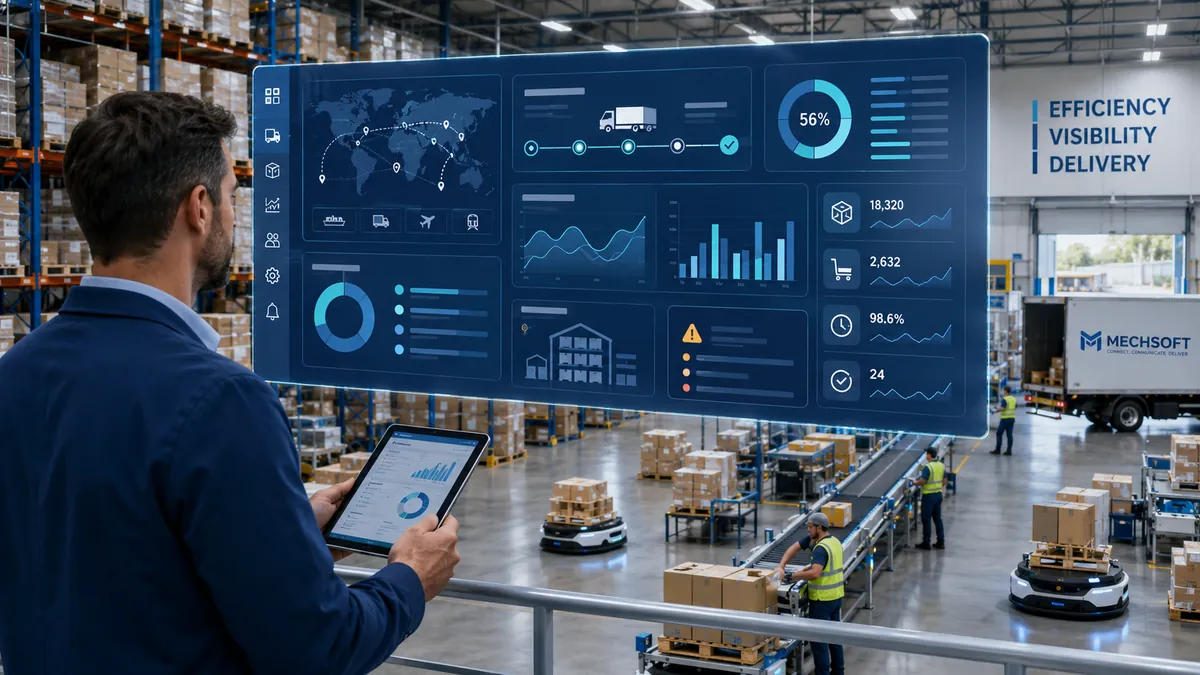
Automation in logistics is becoming increasingly important as manual work starts slowing down daily operations.
Orders are entered again from emails or spreadsheets. Inventory updates fall behind actual stock movements. Dispatch teams spend hours following up on shipments, while billing gets delayed because someone still needs to collect and verify operational records.
For a growing 3PL company, these are not just small administrative tasks. As order volumes increase and more clients come in with different requirements, managing everything manually becomes difficult. Errors increase, coordination takes longer, and some billable activities may go unrecorded.
This is why logistics companies are taking automation more seriously.
Automation does not always mean installing robots or expensive equipment. In many cases, it starts with reducing repeated work and improving how information moves between operations, transportation, finance, and client service teams.
What Is Automation in Logistics?
Automation in logistics is the use of software, connected systems, and equipment to carry out or support logistics activities with less manual intervention.
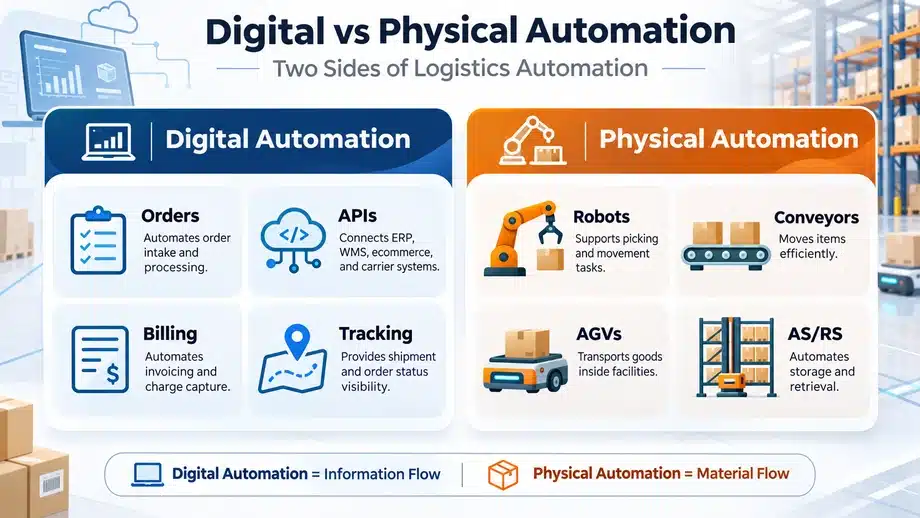
It generally involves two types of automation.
Digital or process automation focuses on activities such as order processing, shipment updates, documentation, billing, reporting, and information exchange between systems.
Physical automation involves equipment such as conveyors, sorting machines, robotics, and automated storage systems that reduce manual material-handling work.
Both are useful, but a logistics business does not need an automated warehouse to begin improving its operations.
Types of Automation Used in Logistics
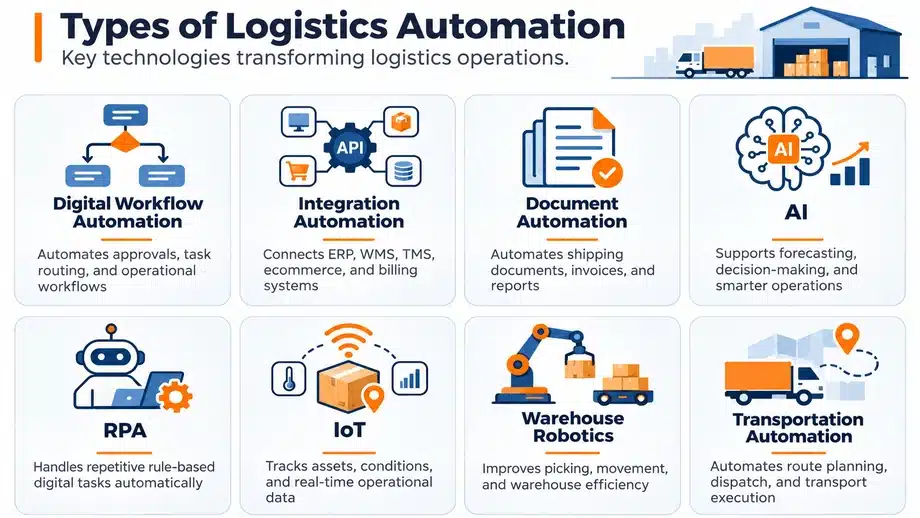
Different activities require different kinds of automation.
|
Type of automation |
Where it is used |
| Digital workflow automation | Moving tasks, approvals, and notifications between teams |
| Order processing automation | Validating orders, identifying duplicates, and updating order statuses |
| Warehouse and physical automation | Sorting, moving, storing, and handling goods |
| Transportation automation | Shipment assignments, tracking updates, and carrier communication |
| Document automation | Extracting information from shipping documents and preparing records |
| Billing automation | Applying configured billing rules to completed activities |
| System integration automation | Exchanging information between client, logistics, carrier, and accounting systems |
| AI-assisted automation | Forecasting, identifying unusual patterns, and supporting operational decisions |
These technologies are also part of the broader logistics technology trends shaping how businesses manage warehouse operations, transportation, and supply chain activities.
Why Companies Are Taking Logistics Automation Seriously
Logistics companies are dealing with increasing order volumes, higher customer expectations, labor availability challenges, and pressure to provide faster operational updates.
For 3PL providers, the situation becomes more complicated because they handle multiple clients.
One client may have specific billing rules. Another may require different shipping labels, delivery schedules, SLAs, or reporting formats.
When these requirements are managed through spreadsheets, emails, and manual approvals, even routine activities can become difficult to coordinate.
The 2025 MHI Annual Industry Report discusses growing investment in digital technologies and connected, end-to-end supply chain systems.
The industry is investing in automation, but that does not mean every logistics business needs to follow the same approach.
What matters is identifying which processes are worth automating and whether the expected improvements justify the investment.
Warehouse and Physical Automation
Warehouse automation is one of the most visible forms of logistics warehouse automation.
Technologies such as conveyors, automated sorting equipment, autonomous mobile robots (AMRs), and automated storage and retrieval systems can help warehouses reduce repetitive physical handling.
Barcode and RFID systems can support the recording of stock movements, while other warehouse technologies may assist with picking, sorting, and inventory counting.
These technologies are useful in operations where physical movement and repetitive handling consume considerable time.
However, warehouse automation addresses only one part of logistics.
A warehouse may process goods faster, but dispatch can still be delayed by manual carrier coordination. Shipment updates may remain scattered across emails, and billing may still depend on records collected from different systems.
This is why logistics companies also need to examine how information moves between operations, transportation, documentation, and finance.
Where Digital Logistics Automation Creates Value
For many growing 3PL businesses, digital automation may be a more practical starting point than investing in physical equipment.
It can address specific activities in order processing, transportation, documentation, billing, and client communication.
1. Order Processing Automation
Some logistics companies still receive orders through emails, spreadsheets, or client files that employees must enter into another system.
As daily order volumes increase, this creates additional work and more opportunities for mistakes.
Depending on the software, order processing automation may support:
- Order intake from connected client systems
- Validation of required information
- Duplicate order detection
- Order status updates
- Workflow routing
- Notifications for missing information or exceptions
- Transfer of order details between applications
For example, when a client sends an order file, a configured import process could check the required fields and identify missing information before the order moves forward.
Employees can then review orders that need correction instead of manually checking every entry.
The effectiveness of this process depends on the quality of the information received and what the selected software can handle.
This becomes particularly important in high-volume order processing, where repeated manual entries and corrections can slow down daily 3PL operations.
2. Dispatch, Tracking, and Logistics Process Automation
Dispatch becomes difficult when shipment assignments, pickup schedules, and carrier communication depend on separate calls, emails, and spreadsheets.
Even after an order is ready, the dispatch team may still need to confirm carrier availability, arrange pickup, verify documentation, and communicate shipment details.
Depending on the software and available integrations, logistics process automation can support carrier assignments, shipment status updates, alerts, delivery event recording, and customer notifications.
This can help teams identify pending shipments, delayed pickups, and delivery exceptions without having to collect every update manually.
The DHL Logistics Trend Radar discusses technologies such as AI, advanced analytics, computer vision, and route-planning tools and their possible applications in logistics.
For 3PL providers managing multiple clients and carriers, the important requirement is to have reliable shipment information available when employees need to make decisions or communicate with customers.
3. Documentation and Billing Automation
Many automation discussions focus on warehouse movement, but completing the physical work is only part of the logistics process.
A shipment may be dispatched while its supporting documents are still being collected. Bills of Lading (BOLs), proof of delivery (POD), freight charges, and other records may be maintained across different systems or emails.
Document automation can help capture, organize, or extract information from shipping records where the selected software supports these functions.
Billing automation can use recorded operational activities and agreed client-specific billing rules to prepare charges for invoicing.
This becomes important when a 3PL provider manages clients with different transportation rates, handling charges, return policies, and other service agreements.
If completed activities are not recorded correctly, billing teams may need additional reconciliation or may overlook billable work.
This is one reason logistics businesses should understand why 3PL companies lose revenue due to manual billing before focusing only on warehouse automation.
4. Client Reporting, Returns, and Reconsignment
Client reporting often requires information from order processing, shipment records, and billing.
When these systems are connected, reports can use existing operational records rather than relying on separate spreadsheets prepared by different teams.
Returns and reconsignment also require coordination.
When a delivery fails or an address changes, supported workflows may help employees record the request, notify the responsible person, and track the next action.
These situations still require judgment, particularly when instructions are incomplete or an exception falls outside standard procedures.
Integration Automation: Connecting Logistics Systems
Automating one task provides limited value when employees must manually transfer the result into another application.
Consider how information may move through a 3PL operation:
Client ERP/ecommerce system → API/EDI integration → 3PL software → Carrier systems → Tracking updates → Billing/accounting systems
API integrations allow compatible applications to exchange information.
Electronic Data Interchange (EDI) supports standardized business document exchanges, while file-based imports may still be useful when APIs are unavailable.
Carrier integrations may provide shipment updates, and accounting integrations can transfer relevant billing information.
But these connections need proper field mapping, data validation, error handling, and monitoring.
If an integration fails, the system should make the problem visible so employees can take corrective action. Otherwise, missing orders or duplicate records may go unnoticed.
The purpose of connecting these systems is to allow information recorded in one part of the operation to be used where it is needed next.
Benefits of Automation in Logistics
The benefits of logistics automation depend on the process being automated, how frequently it is used, and how well it connects with existing operations.
|
Operational area |
Potential benefit |
What to measure |
| Order processing | Less duplicate entry and fewer manual errors | Processing time and correction rate |
| Warehouse operations | Less repetitive physical handling and more consistent warehouse activity recording where supported | Material-handling time, task completion time, and manual checking effort |
| Carrier coordination | Better control over shipment assignments and updates | On-time dispatch and exception resolution time |
| Client communication | More timely order and shipment information | Customer response time and repeated status queries |
| Documentation | Less manual handling of shipment records | Document processing time and correction rate |
| Billing | More reliable application of client-specific charges | Billing accuracy and invoice preparation time |
| System integrations | Less manual transfer of information between applications | Duplicate entries and integration failures |
| Growing transaction volumes | Higher handling capacity without a matching increase in administrative effort | Transactions processed per employee and cost per transaction |
The main financial benefit may come from reducing labor effort, correction costs, or the cost of handling each transaction. These savings depend on the volume of work and the actual implementation results.
Automation can also support more consistent workflows as the business grows, provided the software and infrastructure have sufficient capacity.
These improvements are not guaranteed. Poor configuration, incomplete information, or weak operational processes can create problems even after automation is introduced.
Challenges of Implementing Logistics Automation
Automation requires planning, investment, and ongoing support.
Upfront investment: Software, equipment, integrations, and implementation can involve significant costs.
Legacy system compatibility: Older applications may not support the interfaces or data formats needed for automation.
Data quality: Incorrect order information, inconsistent identifiers, and incomplete records can affect automated processes.
Integration complexity: Connected systems need testing, monitoring, and clear responsibility when something goes wrong.
Employee training and change management: Teams must understand the new process and how their responsibilities may change.
Exception handling: Not every shipment, billing rule, or client request follows a standard workflow.
Maintenance, security, and vendor dependency: Automated systems require updates, access controls, technical support, and dependable technology partners.
The McKinsey’s warehouse automation strategy guidance explains why automation decisions should consider business requirements, process fit, implementation readiness, and expected value.
A common mistake is investing in technology before understanding the process it needs to improve.
When the existing workflow is unclear, automation may create additional problems rather than solve them.
What Should Logistics Companies Not Automate First?
Not every activity is suitable for immediate automation.
Businesses should be cautious about automating processes that are not properly documented or that depend on unreliable information.
Workflows with frequent undocumented exceptions can also be difficult to automate because the system may not know how to handle unusual situations.
Processes that change constantly may require repeated modifications, increasing development and maintenance costs.
Low-volume tasks may not justify the investment either.
Decisions involving significant financial, safety, or service risks should retain appropriate human oversight.
If employees are already making frequent corrections to a process, automating it without understanding those errors may only make the same mistakes happen faster.
The better approach is to establish how the process should work, who is responsible, and what happens when an exception occurs.
Logistics Automation Maturity: From Manual to Connected Operations
Logistics companies do not need to automate everything at once.
Automation often develops gradually as businesses introduce software and connect different operational activities.
The following five stages are an illustrative framework, not an officially standardized industry model.
|
Stage |
How operations typically work |
| 1. Manual operations | Spreadsheets, emails, phone calls, and manual updates |
| 2. Basic digitization | Individual software tools replace selected paper-based or spreadsheet activities |
| 3. Workflow automation | Recurring validation, notifications, and billing calculations are automated |
| 4. Connected systems | Client, logistics, carrier, and accounting applications exchange information |
| 5. Data-driven operations | Analytics and suitable AI-assisted tools support forecasting, exception identification, and operational decisions |
A company may operate at different stages in different departments.
For example, order processing may already be connected to client systems, while billing still depends on manual reconciliation.
In that situation, improving billing connectivity may be more useful than investing in another warehouse tool.
How AI Is Expanding Logistics Automation
AI is creating opportunities to support logistics activities that are difficult to manage through fixed rules alone.
Potential applications include:
- Demand forecasting
- Predicting possible shipment delays
- Extracting information from documents
- Prioritizing operational exceptions
- Identifying unusual transaction patterns
- Supporting route planning
- Assisting customer-service employees
One practical application is predictive analytics in logistics, which uses historical and current operational data to identify potential
shipment delays, inventory risks, and other problems before they affect daily operations.
AI-assisted decision support should not be confused with fully autonomous operations.
A system may identify a possible delay or recommend an alternative route, but employees may still need to review the information and make the final decision.
As with other forms of automation, the value depends on whether the technology addresses a real operational problem.
How to Measure ROI From Logistics Automation
Before implementing automation, businesses should understand how the current process performs and what it costs.
The operational measures in the benefits table can provide a starting point. Companies should record their current performance before introducing automation and compare it with results after implementation.
For a financial assessment, consider:
- Administrative hours saved per order or shipment
- Changes in the cost of correcting errors
- Cost per order or shipment
- Changes in transaction-handling capacity
- Implementation expenses
- Integration and training costs
- Licensing, maintenance, and support costs
This is where data analytics in logistics becomes useful. By examining order processing time, shipment performance, billing records, and operating costs, managers can identify where automation is making a measurable difference.
A simple return on investment calculation is:
ROI (%) = [(Total Quantified Benefits − Total Automation Costs) / Total Automation Costs] × 100
For businesses focused on controlling operating expenses, understanding how automation supports logistics cost reduction can also help identify which repetitive activities are worth improving first.
Quantified benefits may include measurable labor time savings, reduced correction costs, or other documented financial improvements.
Expected savings should not be treated as guaranteed returns. Actual results need to be measured over a defined period using the same basis for comparison.
How to Start Automating Logistics Operations
For a growing logistics company, implementing automation in phases is generally more manageable than changing every process at once.
1. Map Existing Workflows
Document how orders, shipments, documents, and billing information move through the business.
2. Identify Repetitive Tasks and Delays
Look for repeated data entry, manual corrections, unnecessary follow-ups, and recurring exceptions.
3. Record Current Performance
Measure processing time, error rates, administrative effort, and relevant operating costs before making changes.
4. Prioritize Automation Opportunities
Compare potential improvements based on business impact, implementation effort, feasibility, and operational risk.
5. Standardize Processes and Improve Data Quality
Resolve unclear rules, inconsistent records, and unnecessary variations before introducing automation.
6. Select Appropriate Technology
Evaluate software functionality, integration requirements, implementation responsibilities, and long-term support.
7. Start With a Limited Pilot
Test automation on one workflow or a defined part of the operation before expanding it.
8. Test Exceptions and Reliability
Check how the system handles invalid information, failed integrations, and unusual operational situations.
9. Train Employees and Assign Responsibilities
Make sure employees understand the new workflow and know who is responsible for resolving problems.
10. Measure Results and Expand Gradually
Compare performance with the original baseline. Extend automation to other activities where the benefits are demonstrated.
The first automation project does not need to be large. It should solve a problem employees face regularly and produce results the business can measure.
Where Logistics Software Fits In
For many 3PL companies, automation begins with improving how orders, shipments, documents, and billing information are managed across daily operations.
Mechsoft Digital Technologies offers iLogistech as a logistics software solution.
Businesses considering the platform should evaluate its documented order management, carrier coordination, shipment tracking, billing, integration, and reporting capabilities against their operational requirements.
Warehouse robotics, complete WMS functionality, inventory control, and AI-driven optimization should not be assumed to be included without product confirmation.
The right logistics software should address the coordination problems a business actually faces, with the integrations and workflows needed to support its operations.
Frequently Asked Questions About Automation in Logistics
Q.1. What is automation in logistics?
A. Automation in logistics means using software, connected systems, and sometimes physical equipment to reduce manual work in warehousing, order processing, transportation, tracking, documentation, and billing.
Q.2. Is logistics automation only for large warehouses?
A. No. Smaller and mid-sized logistics businesses can also automate selected activities. The deciding factor is whether a process is repetitive, error-prone, and important enough to justify the investment.
Q.3. What are the first processes most 3PLs should automate?
A. Common starting points include order entry, barcode-based inventory updates, dispatch coordination, customer alerts, POD capture, and contract-based billing triggers. Businesses should prioritize the processes causing the most measurable problems.
Q.4. What are the biggest risks of automating too quickly?
A. Poor integration, unclear ROI, conflicts with legacy systems, inadequate support, and disconnected tools can create new bottlenecks. Automating a poorly defined process may also reproduce existing errors.
Q.5. How do the benefits of logistics automation show up in practice?
A. The benefits of logistics automation depend on the activity. Warehouse automation may support faster cycle counts and more reliable stock records, while digital automation may improve order processing, dispatch coordination, documentation, and billing. The results should be measured against the previous process.
Q.6. How is digital logistics automation different from warehouse robotics?
A. Digital automation manages information and workflows, such as order validation, shipment updates, and billing. Warehouse robotics and physical automation help move, sort, store, or handle goods. Many operations use a combination of both.
Q.7. How can businesses calculate logistics automation ROI?
A. Compare measured financial benefits against the full implementation and operating costs over the same period. Use documented baseline information rather than assumed productivity improvements.
Conclusion
Logistics operations are gradually moving away from manual coordination toward more connected processes.
But businesses do not necessarily need to invest in the latest warehouse technology to see improvements.
The useful starting point is to identify which operational activities create unnecessary work or costs, understand why those problems occur, and decide whether automation is the right solution.
Automation is worth the investment when it solves a recurring business problem and the improvement can be measured.


