
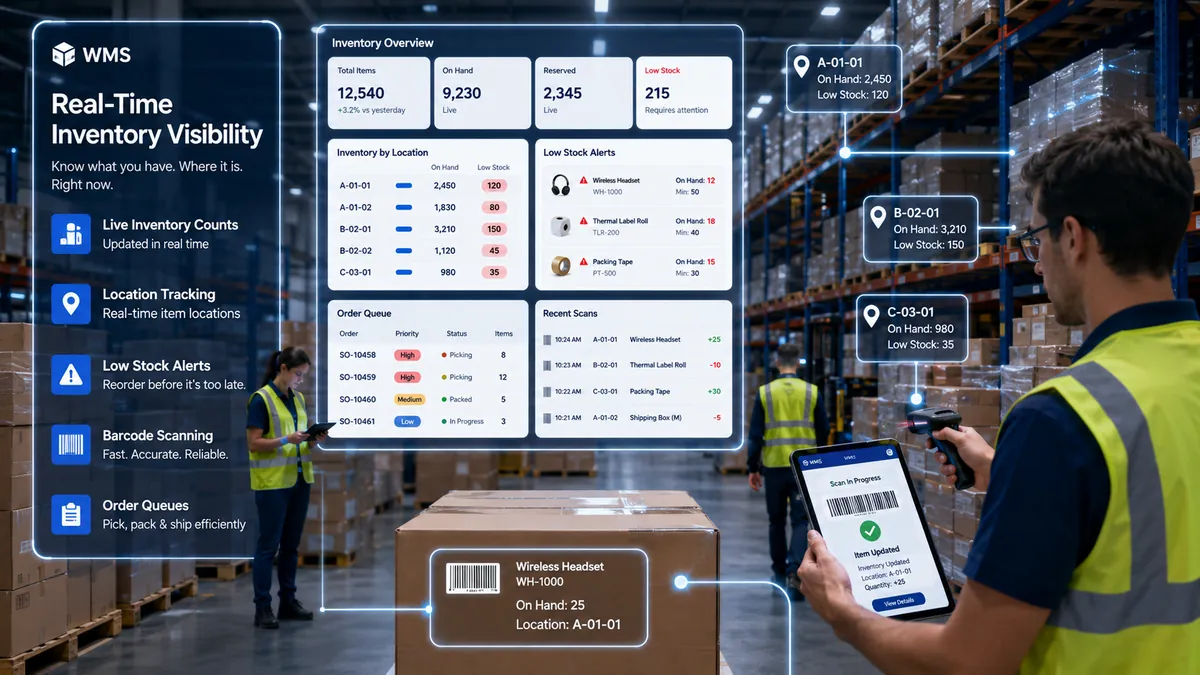
What Is Warehouse Management Software?
Warehouse management software is a system used to manage daily warehouse operations such as receiving, putaway, inventory tracking, picking, packing, shipping, stock movement, and reporting.
A simple answer to what is warehouse management software is this:
It helps warehouse teams know what stock is available, where it is stored, what needs to be done next, and whether each warehouse task has been completed correctly. Without a WMS, teams often depend on Excel sheets, manual registers, phone calls, WhatsApp updates, or memory. This approach can work for smaller operations. But once SKUs, clients, locations, and dispatch volume increase, manual tracking becomes risky.
On paper, warehouse operations seem straightforward. Inventory comes in, gets stored, and eventually leaves as customer orders.
Anyone responsible for warehouse operations knows it is rarely that simple. The hard part is not only moving stock. The hard part is knowing what came in, where it is stored, which client it belongs to, what needs to be picked, what has already been shipped, and what should be reported or billed. That is where warehouse management software becomes important.
For logistics companies and 3PL providers, WMS is not just a digital stock register. It is the system that controls warehouse movement, inventory visibility, order fulfillment, dispatch readiness, client reporting, and sometimes billing-related activity.
What Is WMS in Logistics?
If you are asking what WMS in logistics is, the answer is simple: WMS is the warehouse control layer of logistics operations.
In logistics, warehouse work is connected to transportation, customer service, billing, inventory planning, and client reporting. If warehouse data is wrong, the problem does not stay inside the warehouse.
– A wrong inventory update can delay dispatch.
– A missed scan can create client complaints.
– A wrong pick can cause returns.
– A missing shipment status can delay billing.
For this reason, logistics companies use warehouse management systems to track inventory movement and warehouse activity more accurately. The demand for WMS is growing because warehouses need better inventory tracking, automation, and logistics optimization. MarketsandMarkets projects strong growth for the WMS market from 2025 to 2030, driven by supply chain and inventory tracking needs.
Why Warehouses Need a WMS –
A warehouse needs a warehouse management system when manual control starts creating repeated errors, delays, and follow-ups.
A common example looks like this.
Without WMS: A Common Warehouse Scenario –
A truck arrives with inventory.
The warehouse team unloads the goods and records the quantity in Excel. Later, another team member moves some stock to a different location, but the location is not updated properly.
The next day, an order comes in for the same SKU.
The picker checks the sheet, but the stock is not available at the listed location. The supervisor gets involved.
Dispatch waits. The shipment cannot move until the issue is resolved.
Meanwhile, the customer is waiting for a status update.
The billing team later needs shipment details, but the order status is still unclear. None of these issues are major individually, but together they slow down operations. The 2025 Warehouse/DC Operations Survey reported that warehouse and distribution operators continue to face pressure from inventory shifts, labor constraints, ecommerce volume, and automation adoption.
For a logistics business, WMS helps reduce this pressure by creating one source of truth for warehouse activity.
Instead of asking different people for updates, the team can check the system and see what has arrived, where it is stored, what is ready for picking, what is packed, and what is pending for dispatch.
How a Warehouse Management System Works –
A warehouse management system works by tracking goods and tasks from the moment stock enters the warehouse until the shipment leaves.
Here is the basic WMS workflow:
Goods Received
↓
Receiving Verification
↓
SKU / Barcode Scanning
↓
Putaway Assignment
↓
Inventory Storage
↓
Order Received
↓
Picking Task Creation
↓
Packing & Verification
↓
Dispatch Planning
↓
Shipment Dispatch
↓
Reporting & Billing
What This Means in Daily Warehouse Work:
|
WMS Stage |
What Happens |
Why It Matters |
| Receiving | Goods are checked against order details, supplier details, client details, and quantity | Reduces receiving errors and missing stock entries |
| Barcode / SKU scanning | Items are scanned and recorded in the system | Creates accurate stock records from the start |
| Putaway | Goods are assigned to the right warehouse location | Prevents future picking delays |
| Inventory storage | Stock is tracked by location, status, batch, SKU, or client | Improves inventory visibility |
| Picking | The system creates picking tasks for warehouse staff | Reduces dependency on printed lists and verbal instructions |
| Packing | Items are checked, packed, labelled, and verified | Helps avoid wrong dispatches |
| Dispatch | Orders are marked ready for shipment and connected to delivery flow | Improves dispatch planning and shipment visibility |
| Reporting | Inventory, order, movement, pending task, and client reports are generated | Saves time and reduces manual reporting work |
Many warehouses still rely on spreadsheets, paper records, and manual communication to manage daily tasks.
With WMS, every important warehouse activity is recorded step by step. This helps logistics teams know what arrived, where it is stored, what needs to be picked, what is ready for dispatch, and what should be reported to the client.
Difference Between Standard WMS and 3PL Warehouse Management Software
A standard WMS is usually designed for one company managing its own warehouse. 3pl warehouse management software is different because a 3PL warehouse manages inventory and operations for multiple clients at the same time.
| Feature | Standard WMS | 3PL Warehouse Management Software |
| Inventory Management | Single business inventory | Multi-client inventory |
| Billing Support | Usually limited | Client-specific billing rules |
| Reporting | Internal reports | Client-wise reporting |
| User Access | Internal teams | Internal + client portals |
| Warehouse Operations | Single workflow | Multiple client workflows |
| SLA Tracking | Basic | Client-specific SLAs |
| Storage Charges | Rarely included | Common requirement |
| Scalability | Moderate | Designed for multi-client growth |
Quick Takeaway –
If a warehouse serves only one company, a standard WMS may be sufficient. If a warehouse manages inventory, billing, reporting, and fulfillment for multiple customers, a 3pl warehouse management software solution is typically more suitable.
Common Problems WMS Helps Solve –
A good WMS can help reduce:
- Inventory mismatch
- Wrong picking
- Lost stock
- Delayed putaway
- Slow dispatch confirmation
- Manual client reporting
- Lack of warehouse visibility
- Repeated data entry
- Poor stock movement history
- Dependency on one experienced person
- Billing confusion in 3PL operations
In many 3PL workflow discussions, the issue is not that teams are careless. The issue is that warehouse, dispatch, billing, and reporting data are handled in separate places. That separation creates mistakes.
Key Features of Logistics Warehouse Management Software –
Good logistics warehouse management software should support the actual flow of warehouse work.
Important features include:
- Inbound receiving
- Barcode scanning
- Putaway management
- Location tracking
- Inventory control
- Picking and packing
- Dispatch readiness
- Returns management
- Client-wise inventory
- Document management
- User roles and approvals
- Dashboard and reporting
- Integration with logistics, billing, or transport systems
For 3PL businesses, the system should also support billing-related activity such as handling charges, storage charges, rework charges, and client-specific service rules.
Should Your 3PL Invest in Warehouse Management System?
Not every 3PL needs a complex WMS from day one. The right choice depends on warehouse size, client count, billing complexity, order volume, and reporting expectations.
Use this decision matrix to understand where your operation stands.
| Situation | Manual / Excel-Based Process | Basic WMS | 3PL Warehouse Management Software |
| Small warehouse with low order volume | Works for now | Optional | Usually not needed |
| Single client warehouse | Can work | Good fit | Optional |
| Multiple clients in one warehouse | Risky | Limited | Best fit |
| High SKU count | Difficult to control | Helpful | Strong fit |
| Frequent inventory mismatch | Risky | Helpful | Strong fit |
| Client-wise reporting needed | Manual and slow | Limited | Strong fit |
| Client-specific billing rules | Difficult | Limited | Best fit |
| Dispatch delays due to unclear order status | Common risk | Helpful | Strong fit |
| Multi-location warehouse operations | Hard to manage | Moderate fit | Strong fit |
| Fast business growth | Becomes risky | Moderate fit | Best fit |
If your warehouse is small, predictable, and managed for one client, Excel or a basic WMS may still work.
If your 3PL manages multiple clients, different billing rules, client-wise inventory, dispatch dependencies, and regular reporting, a 3pl warehouse management software solution becomes more practical.
A 3PL does not need the most expensive system on day one. But it does need a system that can grow with operations.
How to Choose the Right WMS for Logistics?
Before choosing a WMS, logistics teams should map their current process clearly.
Ask:
- How do orders enter the warehouse?
- How is stock received and verified?
- How are locations assigned?
- How are picking tasks created?
- How is dispatch readiness confirmed?
- How are returns handled?
- How are clients updated?
- How is billing data captured?
- Which reports are needed daily, weekly, and monthly?
- Which systems need integration?
The right warehouse management system should reduce confusion, not add another layer of work.
For 3PLs, the system should be flexible enough to handle multi-client operations, warehouse rules, dispatch flow, client reporting, and billing support.
FAQ
Q. What is warehouse management software?
A. Warehouse management software is a system that helps manage warehouse operations such as receiving, putaway, inventory tracking, picking, packing, dispatch, and reporting.
Q. What is WMS in logistics?
A. What is WMS in logistics means understanding WMS as the warehouse control system used to manage stock movement, order fulfillment, dispatch readiness, and warehouse visibility inside logistics operations.
Q. What is the difference between WMS and 3pl warehouse management software?
A. A normal WMS usually manages one company’s warehouse. 3pl warehouse management software manages multiple clients, client-wise inventory, different billing rules, different reports, and different workflows inside one or more warehouses.
Q. Why is a warehouse management system important?
A. A warehouse management system helps reduce stock errors, manual work, picking mistakes, dispatch delays, and reporting gaps. It gives warehouse and logistics teams better control over daily operations.
Q. Who needs logistics warehouse management software?
A. Logistics companies, 3PL providers, fulfillment centers, distributors, and warehouses managing growing order volume, multiple clients, or complex inventory workflows may need logistics warehouse management software.
Conclusion –
Warehouse management software helps logistics teams control what happens inside the warehouse, from receiving to dispatch.
For small operations, manual tracking may work for some time. But as clients, SKUs, orders, locations, and reporting needs increase, manual systems start creating errors and delays.
A strong WMS gives warehouse teams better visibility, reduces dependency on memory and spreadsheets, improves inventory accuracy, and supports faster fulfillment.
For 3PL companies, the need is even stronger because they manage multiple clients, different workflows, and billing rules inside the same operation.
The right WMS is not only a software purchase. It is a way to bring discipline, visibility, and control into warehouse operations before manual gaps start affecting clients and margins.
Reviewed by a logistics software consultant with experience in warehouse workflow mapping, 3PL operations, inventory tracking, dispatch coordination, document workflows, and client reporting systems.
Reviewed by a logistics software consultant with experience in 3PL workflow mapping, document workflows, client reporting systems, billing processes, and operational visibility.


